When you’re building or upgrading a PC, you probably focus on the CPU, GPU, and RAM. These components, naturally, grab the headlines, and for good reason! However, what about the unsung hero that ties it all together? Indeed, your motherboard is the foundation of your system. Consequently, its motherboard durability and longevity are absolutely crucial. Thus, discerning consumers understand component quality. Key parts, for instance, include solid capacitors and robust VRMs. Moreover, these fundamentally impact system reliability. Ultimately, they directly influence motherboard durability and longevity.
Now, let’s explore high-quality motherboards. Indeed, investing in them is smart for your PC’s future. Specifically, they use advanced components. Moreover, superior engineering protects your investment. Ultimately, it ensures stable performance for years.

The Unsung Heroes: Solid Capacitors and Their Lifespan
Electronic components, namely, rely on power filtration. Capacitors, for instance, show this clearly. For decades, electrolytic capacitors were the industry standard. Unfortunately, their liquid electrolyte was a ticking time bomb. Specifically, it could dry out, swell, or leak. Consequently, this caused instability, poor performance, and early failure. However, solid capacitors now step in. Thus, they transform motherboard durability and longevity.
Why Solid Capacitors Outperform Electrolytic Ones
First, imagine a tiny, high-performance battery on your motherboard. Electrolytic capacitors, for example, use a liquid electrolyte. Indeed, like any liquid, it can evaporate or degrade. This occurs especially under consistent heat. Solid capacitors, however, use a solid organic polymer. Ultimately, this fundamental difference is a game-changer for lifespan and reliability.
For instance, at 65°C, a solid capacitor can last 23 years. Comparatively, this is six times longer than an electrolytic one. Conversely, electrolytic capacitors might fail after three years. Some solid aluminum capacitors, in fact, boast over 50 years. Thus, they will practically outlast your entire system. Clearly, this impressive lifespan enhances motherboard durability and longevity.
Performance Advantages Beyond Lifespan
Indeed, the benefits of solid capacitors extend far beyond just their impressive lifespan. Specifically, their design offers performance advantages. Furthermore, these contribute to a more stable and efficient motherboard. Ultimately, these robust characteristics directly contribute to motherboard durability and longevity.
- Lower Equivalent Series Resistance (ESR): They present significantly lower impedance at higher frequencies. This, consequently, translates to cleaner power delivery, less electrical noise, and reduced heat generation. Indeed, all of these factors are critical for stable operation.
- Higher Tolerance: Solid capacitors handle higher temperatures, frequencies, and currents with far greater resilience. For instance, contemplating overclocking your CPU? In that case, these robust components are essential, since they maintain stability under increased stress.
- Stable Capacitance: Liquid counterparts have less stable capacitance. Conversely, solid capacitors remain remarkably stable. Specifically, this occurs across various operating temperatures. Furthermore, this consistency ensures reliable power filtering. Consequently, it works regardless of workload or ambient conditions.
Industry Adoption and Real-World Impact
Recognizing these profound benefits, leading motherboard manufacturers have widely adopted all-solid capacitor designs. Brands like Gigabyte, with their acclaimed “Ultra Durable” series, for example, were early pioneers. Specifically, they incorporated high-quality solid capacitors from renowned Japanese vendors, thus setting a new benchmark for reliability. Moreover, these components are often rated for an astounding 50,000 hours of operation at 85°C. Historically, capacitors often failed on motherboards. However, this shift to solid-state technology is a monumental improvement. Consequently, it boosts overall motherboard durability and longevity. In essence, it’s a quiet revolution. Ultimately, it ensures your motherboard stays healthy and reliable for years.
The Heart of Power: Robust VRMs and System Stability
Beyond capacitors, furthermore, another critical area is VRMs. VRMs are, specifically, Voltage Regulator Modules. Indeed, they ensure long-term system health. In short, think of VRMs as your CPU’s personal power station. Essentially, it takes power from your PSU and refines it meticulously. Stable, clean, and regulated voltage is then delivered, powering your CPU, GPU, and RAM. Consequently, a robust VRM design is not a luxury. Rather, it is a necessity for exceptional motherboard durability and longevity. This is true for demanding workloads. Moreover, it also applies when pushing hardware limits.
How VRMs Deliver Stable Power for Long-Term Longevity
The primary function of a VRM is, therefore, to prevent voltage fluctuations. Consequently, without a high-quality VRM, your CPU gets inconsistent power. This, in turn, causes instability, crashes, or early component degradation. To illustrate, imagine trying to drive a car with an erratic fuel pump; you wouldn’t get far. Similarly, a well-designed VRM ensures consistent power flow. Thus, your vital components receive reliable power. Indeed, this is essential for peak performance. It helps during intensive tasks like gaming or editing. Moreover, it also aids complex computations. Ultimately, consistent power delivery extends hardware lifespan. Finally, it boosts overall system motherboard durability and longevity.
VRMs and the Overclocking Frontier
For enthusiasts who dabble in overclocking, the quality of your VRM, therefore, moves from important to absolutely critical. This is because overclocking pushes your CPU past factory settings. This, in turn, increases power demands significantly. Consequently, heat generation rises. However, a robust VRM handles this additional stress with grace.
Such VRMs are characterized by:
- Efficient Components: Specifically, high-quality MOSFETs, chokes, and PWM controllers minimize energy loss and heat.
- Higher Number of Power Phases: More power phases mean the electrical load is distributed across more components. Consequently, this reduces stress and heat on each part. Furthermore, it dramatically contributes to greater stability. Indeed, this is key during strenuous overclocking sessions. Ultimately, it bolsters motherboard durability and longevity.
If you’re interested in safely enhancing your system’s capabilities, then explore our [Guide to Safe Overclocking](/blog/safe-overclocking-guide/).
The Critical Role of Thermal Management for Motherboard Lifespan
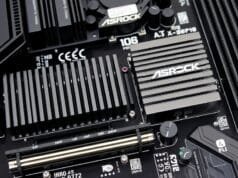
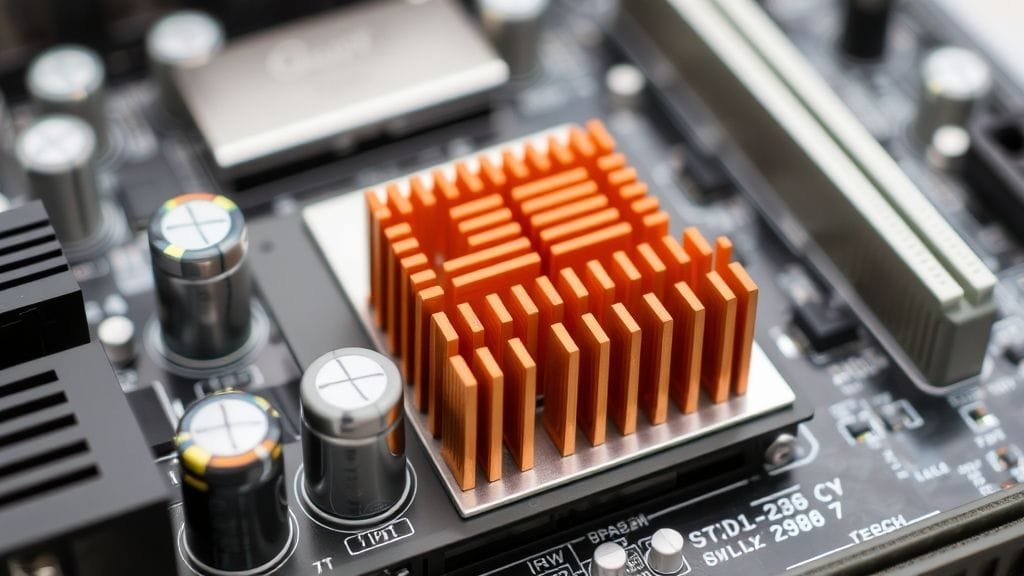
VRMs, by their very nature, generate heat as they regulate power. This, consequently, is an unavoidable part of their operation. Therefore, effective thermal management is paramount for motherboard durability and longevity. Specifically, robust VRMs feature dedicated heatsinks. These are often substantial. Some, for example, integrate into I/O shrouds or use heatpipes. Ultimately, these effectively dissipate heat from critical components. Conversely, poor VRM efficiency and inadequate cooling cause excessive heat. This heat, indeed, kills electronics silently. Furthermore, it accelerates degradation. Thus, it significantly shortens the motherboard’s life. Effective VRM cooling is therefore paramount for superior motherboard durability and longevity.

Discerning Component Selection in VRMs for Enhanced Durability
A VRM is not, simply put, a monolithic component. Instead, it’s an intricate assembly of various elements. These include, for example, the PWM controller. It orchestrates power delivery. MOSFETs, likewise, switch the power. Chokes, moreover, smooth the current. And, of course, capacitors are vital. Consequently, the quality of each component matters. Indeed, it impacts VRM efficiency and reliability. Ultimately, it affects your motherboard’s health. Therefore, discerning consumers often scrutinize these details. They know a superior power system, in fact, helps stability. It also offers better overclocking potential. Furthermore, it ensures exceptional motherboard durability and longevity. Indeed, for deeper insights into VRM design, you might consult detailed analyses from [AnandTech’s VRM guides](https://www.anandtech.com/tag/vrm). While budget motherboards suffice for stock CPU operation, higher-end boards invest in robust VRM solutions. This, in turn, guarantees prolonged operational integrity. Essentially, it works under any conditions.
Beyond Components: Factors Influencing Overall Motherboard Lifespan
Solid capacitors and robust VRMs are critical. However, other factors also shape overall motherboard durability and longevity. Generally, a consumer motherboard typically lasts 5-7 years. However, well-maintained boards often function for 10-20 years. Some, indeed, last even longer. Furthermore, industrial-grade “long-life motherboards” exceed 7-10 years. In contrast, standard consumer models sometimes last 3-5 years. Ultimately, understanding these influences empowers you. Consequently, you can maximize your system’s lifespan. This, in turn, enhances overall motherboard durability and longevity. For broader understanding, meanwhile, [HowStuffWorks](https://electronics.howstuffworks.com/electronic-components-and-parts.htm) offers excellent primers.
Environmental Factors and Usage Habits
Heat is arguably the biggest enemy of electronics. Indeed, constant overheating, whether from poor case airflow or clogged heatsinks, will inevitably shorten your motherboard’s life. Similarly, dust accumulation acts like an insulating blanket, trapping heat and hindering cooling. Furthermore, high humidity can also accelerate corrosion and component degradation.
To combat these threats and significantly enhance motherboard durability and longevity, therefore, consider these proactive steps:
- First, ensure proper case ventilation with a good fan setup.
- Second, regularly clean your PC internals to prevent dust buildup.
- Third, maintain a moderate ambient temperature in your computer’s environment.
- Finally, avoid placing your PC in direct sunlight or overly humid areas.

The Unseen Influence of Your Power Supply
It’s easy to overlook the power supply unit (PSU). Yet, it plays a monumental role in motherboard health. Specifically, a high-quality PSU provides clean, stable power to all your components, including the motherboard. Moreover, it protects them from voltage spikes, dips, and ripple. Conversely, a cheap PSU delivers unstable power. This, in turn, stresses motherboard components. VRMs and capacitors are especially affected. Consequently, this can significantly shorten its lifespan. Indeed, a faulty PSU often causes motherboard failures. Thus, it impacts motherboard durability and longevity. Therefore, investing in a reputable, efficient PSU is an indirect yet powerful way to boost motherboard durability and longevity. For further assistance, to choose the right PSU, refer to our guide on [Power Supply Unit Selection](/blog/choosing-the-right-psu/).
Manufacturing Quality: The Foundation of Durability
The overall build quality of your motherboard, therefore, forms its fundamental resilience. This encompasses, for example, the printed circuit board (PCB) design. Features like 2 oz copper layers, in fact, enhance stability. They also, crucially, improve thermal dissipation. Moreover, quality extends to every IC, resistor, and connector. Consequently, reputable manufacturers invest in stringent quality control and superior materials. However, manufacturing defects can lead to early failures. Improper handling or microscopic short circuits also, sometimes, cause issues. You can’t inspect these directly. Thus, choosing well-regarded brands implies higher quality. This, in turn, contributes positively to motherboard durability and longevity. Ultimately, this is why overall manufacturing quality is a key predictor of motherboard durability and longevity. For more insights, for instance, explore [Wikipedia’s article on Motherboards](https://en.wikipedia.org/wiki/Motherboard).

Common Motherboard Failure Points to Watch For
Our focus is, first and foremost, preventing premature failure. Therefore, it’s wise to know common weak links. These can, unfortunately, compromise motherboard durability and longevity. Capacitors, as discussed, are frequently cited. However, other components also have limited lifespans:
- CMOS Battery: This small coin-cell battery powers the real-time clock and BIOS settings. Typically, it lasts 5-6 years before needing replacement. Nonetheless, its failure rarely cripples the entire board.
- Diodes and MOSFETs: These semiconductors regulate power. However, they can degrade over time. Specifically, this happens especially under high heat or electrical stress.
- Electrostatic Discharge (ESD): Static electricity is an invisible threat. Indeed, a single, uncontrolled static discharge can fry components. Moreover, this occurs regardless of overall quality. Therefore, always practice anti-static precautions. Specifically, do this when working inside your PC.
- Physical Damage: For example, accidental drops, bending, or excessive force. Such damage, can cause irreversible damage. This, importantly, applies to the PCB or connectors.
To learn more about general PC maintenance, furthermore, consider visiting a comprehensive guide on [PC cleaning and upkeep](/blog/pc-maintenance-guide/).
Conclusion
Investing in a PC is a significant decision. Indeed, your motherboard is its cornerstone. As we’ve explored, component quality, therefore, impacts motherboard durability and longevity. Crucial components, for instance, include solid capacitors and robust VRMs. These aren’t just technical specifications. Rather, stable performance is assured. Furthermore, enhanced reliability is ensured, and an extended operational lifespan is provided. Ultimately, all this contributes to superior motherboard durability and longevity.
Therefore, choose a motherboard with superior components. This, consequently, means less worry about premature failure. Moreover, it offers better potential for demanding tasks. Overclocking is one example. Ultimately, it gives more long-term value. So, when evaluating a motherboard, look beyond flashy marketing. Instead, delve into its build quality. This thoughtful approach, indeed, ensures your PC’s reliability. Ultimately, it will be a workhorse or gaming powerhouse for many years.
What factors do you prioritize most when selecting a new motherboard for your build, and why? Share your thoughts in the comments below!