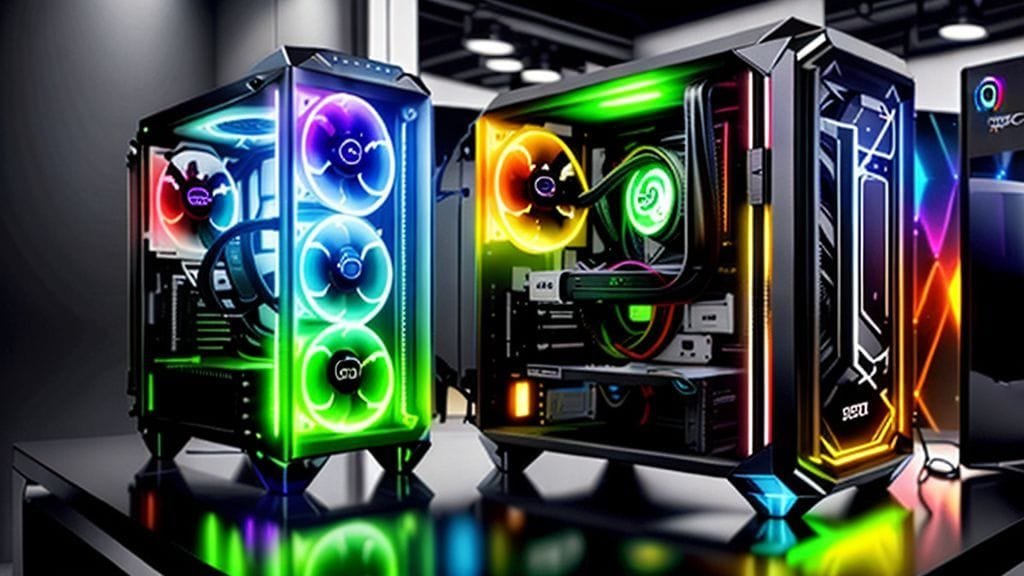
Imagine a PC that captivates your senses. This machine not only performs tasks, but it also radiates your personality. It has a vibrant, dynamic glow. This isn’t science fiction; indeed, it’s the reality of an RGB PC build. Customizable lighting was once a niche for enthusiasts; however, it’s now a cornerstone of modern PC aesthetics. It consequently transforms hardware into a personalized visual masterpiece.
An RGB PC build prioritizes aesthetic integration, thereby ensuring synchronized control of customizable lighting. Moreover, this lighting covers nearly every component. Therefore, it’s not just a statement; it is, in fact, a visual symphony. Ultimately, it immerses you deeper into your digital world. But how do you orchestrate such a dazzling display? Furthermore, what considerations should guide your journey? Consequently, let’s explore building an ultimate RGB setup.
The Allure of the RGB PC Build: More Than Just Bling
For many, a PC is merely a tool; however, for others, it’s a canvas. Furthermore, it’s a platform for expression. Indeed, an RGB PC build elevates this concept, thus inviting you to infuse hardware with character and flair. Moreover, this approach transcends raw performance metrics, and instead, it taps into our emotional and personal connection with technology.
Beyond Performance: The Visual Revolution
RGB lighting offers no direct boost to processing power, nor does it improve frame rates. Still, its impact is undeniably profound. Indeed, think of it as an artistic flourish on a powerful engine. Instead, it transforms a cold electronic box into a living, breathing entity. Consequently, this entity pulses with light and color. Ultimately, this visual revolution moves you beyond generic gray or black towers, thereby letting you create something truly unique.
Personal Expression Through Light
Thus, personalization is a compelling aspect of an RGB PC build. Specifically, you gain the power to dictate your setup’s mood and also choose its theme and overall vibe. Do you prefer the serene calm of cool blues or the fiery intensity of reds and oranges? Alternatively, maybe you want a dynamic spectrum which can shift with your activities. In this way, your PC becomes a direct reflection of your personality and an extension of your digital self, as it glows brilliantly on your desk.
Essential Components for Your Dazzling RGB PC Build
Indeed, nearly every modern PC component now offers RGB lighting, specifically some with ARGB (Addressable RGB) lighting. Moreover, ARGB represents a significant leap forward since it allows individual LEDs to be controlled independently. This unlocks breathtaking dynamic effects, whereas standard RGB cannot match them. Therefore, to achieve a truly integrated RGB PC build, consider lighting across your entire system.
The Case: Your Luminous Canvas
Consequently, the PC case is crucial for showcasing your RGB PC build. For instance, modern cases are meticulously designed, typically featuring tempered glass panels located on the side, front, and sometimes the top. This thus provides unobstructed views of the internal light show. Many cases also come with pre-installed RGB fans and even some with integrated LED strips, consequently giving you a head start on your luminous journey.
- Choosing the Right Case: First, look for cases with ample space and also room for cable management. Furthermore, ensure good airflow for cooling components. It also needs space for additional lighting elements. Ultimately, a well-designed case frames your vibrant artwork perfectly.

Motherboards: The Central Command for Color
Your motherboard serves as the PC’s nervous system; however, in an RGB PC build, it’s also the central hub for lighting control. Moreover, most contemporary motherboards feature integrated RGB lighting zones. Crucially, they have RGB and ARGB headers, thus allowing you to connect lighting, including fans, LED strips, and even some peripherals.
- Software Ecosystems: For instance, each major motherboard manufacturer offers proprietary software, such as ASUS Aura Sync, MSI Mystic Light, or Gigabyte RGB Fusion. Therefore, choosing a motherboard often means committing to its software ecosystem. Consequently, this influences compatibility with other brands.
Cooling: Keeping it Chill and Colorful
Indeed, efficient cooling is vital for PC performance. However, with an RGB PC build, you get not only excellent thermal management but also stunning visuals. Moreover, RGB fans are ubiquitous, providing both essential airflow and a splash of color. Furthermore, All-in-One (AIO) liquid coolers are a popular choice since they offer maximum cooling and greater visual impact.
- AIO Coolers: Typically, these units often feature RGB pumps and fans, thus creating a striking centerpiece for your build. Furthermore, the glowing reservoir and fan blades add a dynamic element, thereby enhancing your system’s internal landscape.
- Air Coolers: High-performance air coolers are also available and often come with RGB fans. Furthermore, sometimes heatsinks are illuminated. Therefore, they offer a viable alternative for air cooling, maintaining an RGB aesthetic too.
Memory & Graphics: Power with a Glimmer
Moreover, your RAM and graphics card can join the light show, especially in an RGB PC build. Specifically, RGB RAM modules have integrated LEDs and consequently light up your system’s memory slots. Furthermore, they often have intricate, customizable patterns which flow across the modules. Similarly, many high-end graphics cards feature integrated RGB lighting, typically on their cooling shrouds or backplates.
- RAM Aesthetic: Indeed, RGB RAM adds a distinctive glow, particularly when paired with a motherboard which offers complementary lighting. Thus, it’s a subtle yet impactful detail.
- GPU Integration: Certainly, a glowing GPU enhances the overall visual scheme, particularly in a vertically mounted configuration. Thereby, it fully showcases its design.

Peripherals and Beyond: Extending the Glow
Moreover, the aesthetic of an RGB PC build can extend beyond your case. Indeed, modern gaming peripherals commonly integrate RGB lighting, thereby allowing you to extend your synchronized light show to cover your entire desktop.
- Keyboards and Mice: For example, RGB mechanical keyboards and gaming mice are staples, and consequently, they often feature per-key or multi-zone lighting.
- Headsets and Mouse Pads: Furthermore, even headsets and large mouse pads are available which have integrated RGB, thus creating a truly immersive and cohesive environment.
- Supplemental Lighting: Moreover, supplemental RGB LED strips are invaluable; they can either fill dark spaces or enhance specific areas. Furthermore, illuminated power supply cables, often called “streamer cables,” can replace standard black cables and instead offer vibrant, glowing alternatives. Thereby, this adds another layer of visual complexity and flair to your RGB PC build.
The Art of Synchronization: Mastering Your RGB Ecosystem
However, achieving seamless synchronization is a big hurdle, especially for components from different manufacturers. Indeed, a unified light show is the dream; the reality, however, can be a disjointed collection of clashing colors.
The Challenge of Disparate Software
Typically, most major hardware brands have their own RGB control software, such as ASUS Aura Sync, MSI Mystic Light, Gigabyte RGB Fusion, Corsair iCUE, and Razer Synapse. These programs, however, work well within their respective ecosystems; nevertheless, they struggle to communicate with other brands’ components. Consequently, this often leads to “rainbow puke,” which is a chaotic explosion of unsynchronized colors that detracts from the intended aesthetic.
- Resource Bloat: Firstly, running multiple RGB software applications is resource-intensive, since it consumes valuable CPU and RAM which otherwise could be for gaming or productivity.
- Compatibility Headaches: Moreover, interoperability issues are common, consequently leading to frustration for users as they try to unify disparate lighting elements. Furthermore, proprietary ecosystems can lock users into a single brand, thereby limiting component choices.
Universal Control: OpenRGB and SignalRGB
However, a new generation of universal RGB control software is emerging and consequently tackles these compatibility challenges. Indeed, solutions like OpenRGB and SignalRGB are game-changers, particularly helping those committed to a cohesive RGB PC build. Furthermore, these applications provide a single interface, allowing them to manage a vast array of devices from different manufacturers.
- Open-Source Innovation: Notably, OpenRGB is open-source, thus benefiting from community contributions, meaning that its compatibility list and features continually expand. Consequently, it offers basic yet effective control over many devices.
- Advanced Features: In contrast, SignalRGB goes a step further, often providing more sophisticated features such as advanced game integrations, music visualization, and ambient lighting effects that can react to your screen content. Thereby, this truly transforms your setup, creating an immersive experience. Consequently, your RGB PC build feels more alive than ever.
https://www.youtube.com/watch?v=b_jmMbdyzuw
Weighing the Brilliance: Pros and Cons of an RGB PC Build
Undoubtedly, an RGB PC build journey is exciting. However, like any investment, it has both advantages and disadvantages. Ultimately, understanding both sides helps you make an informed decision and also manage expectations.
The Irresistible Advantages of Luminous Computing
An RGB PC build appeals for many reasons:
- Aesthetic Enhancement & Personalization: First and foremost, this is the primary driver. Indeed, you can craft a PC that matches your mood, game, or decor. Moreover, since you can switch between millions of colors and dynamic effects, your PC can consequently constantly evolve with your tastes.
- Immersive Gaming Experience: Imagine your PC lighting reacting to in-game explosions, or alternatively, it can sync with your favorite music. Or, for example, it can subtly change color to indicate critical system temperatures. Indeed, such synchronized lighting deepens immersion and pulls you further into the digital world.
- Showcasing & Ambiance: Furthermore, an RGB PC build makes a stunning centerpiece, especially for streamers and content creators; it’s also for anyone who loves their tech. Moreover, it adds a professional and visually appealing backdrop to your content. It can also provide customizable mood lighting, which is less harsh for your workspace.
- Functional Indicators: Notably, RGB can be surprisingly functional. For instance, you can program lighting to change color depending on CPU or GPU temperature; green for cool, red for hot, for example. Alternatively, it can highlight specific keys on a keyboard, thereby offering in-game advantages.
- Upgradability and Flexibility: Furthermore, RGB components are modular. Thus, you can start with a basic setup, then gradually expand your lighting over time. Consequently, this offers great flexibility for future upgrades and also allows aesthetic revisions.
Navigating the Shadows: Potential Drawbacks to Consider
The path to a glowing RGB PC build has challenges:
- No Performance Boost: Firstly, this is crucial to remember: while RGB lighting is visually stunning, yet it offers no direct improvement to your PC’s speed, processing power, or gaming performance. Instead, resources spent on premium RGB components could go elsewhere, buying higher-performance functional parts.
- Higher Cost: Moreover, RGB-enabled components and peripherals are almost always more expensive when compared to non-RGB counterparts. Consequently, this can significantly increase your RGB PC build budget.
- Increased Power Usage: Additionally, all those LEDs draw power, consequently leading to a slight increase in energy consumption. While it’s not substantial for a single component, however, a fully lit rig can add up.
- Compatibility and Software Bloat: As previously discussed, unifying different RGB ecosystems can be a headache, since it leads to multiple, resource-intensive software applications which run in the background. Moreover, this “software bloat” can sometimes cause system instability and also consume valuable resources.
- Cable Management Complexity: Furthermore, cable management is critical in any PC build; however, it becomes a greater challenge with an RGB PC build, specifically due to many additional wires. Moreover, messy cables obstruct airflow; more importantly, they also detract from your light show.
- Distraction and Eye Strain: Occasionally, overly bright or rapidly changing RGB patterns can be distracting for some users, particularly such as professional gamers or those in low-light environments. Furthermore, it can even cause eye strain. Therefore, thoughtful configuration is key.
- “Rainbow Puke” Aesthetic: Finally, an unrestrained abundance of clashing RGB effects looks garish and unappealing. Specifically, this “rainbow puke” trend involves components flashing different random colors. However, its popularity has declined, and instead, more tasteful, synchronized designs are now preferred.

Crafting Your Vision: Tips for a Harmonious RGB PC Build
Ultimately, achieving a harmonious and striking RGB PC build needs more than just lights; rather, it demands careful planning, strategic selection, and also meticulous execution. Here’s how to avoid “rainbow puke” and create a truly breathtaking luminous rig.
Planning Your Aesthetic Palette
First, before buying components, visualize your desired aesthetic. What colors, themes, or moods do you want? Indeed, a cohesive color scheme is paramount. Do you prefer a single static color, a subtle breathing effect, or a dynamic wave which could wash over your components?
- Inspiration is Key: Therefore, look at other RGB builds online, watch videos, and gather inspiration. Ultimately, mood boards can help solidify your vision.
- Consider Your Environment: Also, think about how the lighting will interact, specifically as it affects your room’s decor and ambient light. Thus, a thoughtful RGB PC build integrates seamlessly.
Strategic Component Selection
Firstly, prioritize components known for good RGB integration; they should also have robust software support. Moreover, try to stick to a single major brand, for example, for your motherboard, fans, and AIO cooler. Thereby, this simplifies software synchronization considerably.
- ARGB is Superior: Therefore, opt for ARGB (Addressable RGB) components whenever possible, since they offer more granular control and consequently lead to intricate and visually impressive effects.
- Read Reviews: Finally, always check reviews for specific RGB components to gauge their lighting quality, software reliability, and ease of integration. Ultimately, a well-researched purchase saves future headaches.

Taming the Cable Hydra
As noted earlier, cable management is critical in any PC build; however, it becomes a greater challenge with an RGB PC build, specifically due to many additional wires. Moreover, messy cables obstruct airflow; more importantly, they also detract from your light show.
- Modular PSU: Therefore, invest in a fully modular power supply, which minimizes unnecessary cable clutter.
- Cable Ties & Sleeves: Furthermore, utilize zip ties, Velcro straps, and cable combs to neatly route and bundle all cables, specifically including power, data, and RGB headers. Moreover, custom sleeved cables add a premium touch and also help with organization.
- Behind the Motherboard Tray: Typically, modern cases offer ample space behind the motherboard tray, which hides excess cable length and thereby ensures that the visible interior remains pristine.
Iterate and Refine Your Light Show
Ultimately, building an RGB PC build is an iterative process. Therefore, don’t expect perfection on your first try. Subsequently, once assembled, spend time experimenting with the software, trying out different effects, colors, and speeds.
- Software Exploration: Be sure to explore your chosen RGB control software fully, or alternatively, use universal solutions like OpenRGB/SignalRGB. Since then you might discover unique effects.
- Feedback Loop: Furthermore, observe your build in various lighting conditions and get feedback from others. While something might look great in a dark room, however, it might be overwhelming in daylight. Ultimately, an ultimate RGB PC build is an evolving project that reflects your ongoing creativity. For more tips on optimizing your setup, check out our guide on [/blog/pc-optimization-tips/].
Future Trends in PC Lighting: What’s Next for RGB PC Builds?
Indeed, the evolution of PC lighting is far from over. As technology advances continually, therefore, we can expect more sophisticated solutions to be integrated into RGB PC builds. For instance, imagine AI-driven lighting which dynamically adjusts to your emotional state, or even entire room synchronization extending beyond peripherals to smart home devices. Moreover, further advancements in micro-LED technology are expected, which could lead to finer control for individual lighting elements, and also hyper-realistic effects whereby textures and surfaces could incorporate them. Furthermore, the drive towards open standards will continue, as will universal control software, thereby promising a future without disparate lighting ecosystems. Consequently, a perfectly synchronized, dynamic, and personalized RGB PC build will be more attainable. Our blog also covers other exciting developments in [/blog/pc-hardware-innovations/].
Conclusion: Your Luminous Legacy
Ultimately, an RGB PC build is more than glowing components; rather, it’s a statement and represents personal artistic expression. This type of build is also a testament to technology and creativity. While it introduces considerations like cost, power usage, and software complexities as factors, yet the rewards are undeniable; namely, you get a visually stunning and immersive system. Therefore, building an ultimate RGB PC build is a journey that involves meticulous planning and vibrant execution.
As you are embarking on your luminous computing journey or perhaps refining it, what aspect of an RGB PC build excites you most? Furthermore, what challenges have you faced? Therefore, share your experiences in the comments below!