Many users fondly remember Windows 7 Legacy, released by Microsoft on October 22, 2009. For them, it represented a time when computers simply worked. It was stable and remarkably easy to use. Users rarely encountered constant problems. Moreover, it arrived as a much-anticipated successor to Windows Vista, which had faced widespread criticism, and users eagerly awaited its release. Consequently, the operating system quickly gained global popularity. Indeed, it soon set a high bar for stability and performance. Newer operating systems often found this level difficult to match. This article explores why Windows 7 Legacy was special, why users loved it, and its lasting impact.
The Dawn of a New Standard: Windows 7 Legacy’s Success
Windows 7 Legacy garnered excellent reviews from both critics and users. This stood in stark contrast to the mixed reactions that had greeted Vista. Microsoft had learned valuable lessons from Vista’s shortcomings. Therefore, they meticulously focused on making this version smooth, dependable, and user-friendly.
Learning from Vista, Focusing on Performance
Windows Vista had introduced visually appealing features, such as the Aero user interface. However, it was plagued by performance issues. It also demanded robust computer hardware. Consequently, Microsoft paid close attention to this feedback. They aimed to retain Vista’s aesthetic. Nevertheless, they significantly enhanced its underlying performance. The system utilized smart, efficient code. This meant it consumed fewer system resources. As a result, it ran smoother and faster across a wide range of hardware configurations. This commitment truly defined Windows 7 Legacy. In addition, users also quickly noticed faster startup times and quicker program launches. Ultimately, the overall system responsiveness was markedly improved.
User interaction with the computer also saw significant improvements. Specifically, while retaining Aero’s appealing visuals, it streamlined usability. For example, Vista’s often bothersome User Account Control (UAC) alerts appeared less frequently. Thus, this made everyday computing significantly smoother for users. This was a crucial aspect of Windows 7 Legacy.
Innovative Features That Defined the Windows 7 Legacy Era
Windows 7 Legacy went beyond merely addressing past issues. Instead, it also introduced fresh, highly beneficial features. Indeed, these features genuinely enhanced user experience. They made tasks simpler and quicker to perform. Moreover, these improvements integrated seamlessly into the system. Therefore, they felt natural and intuitive for all users.
The Redesigned Taskbar
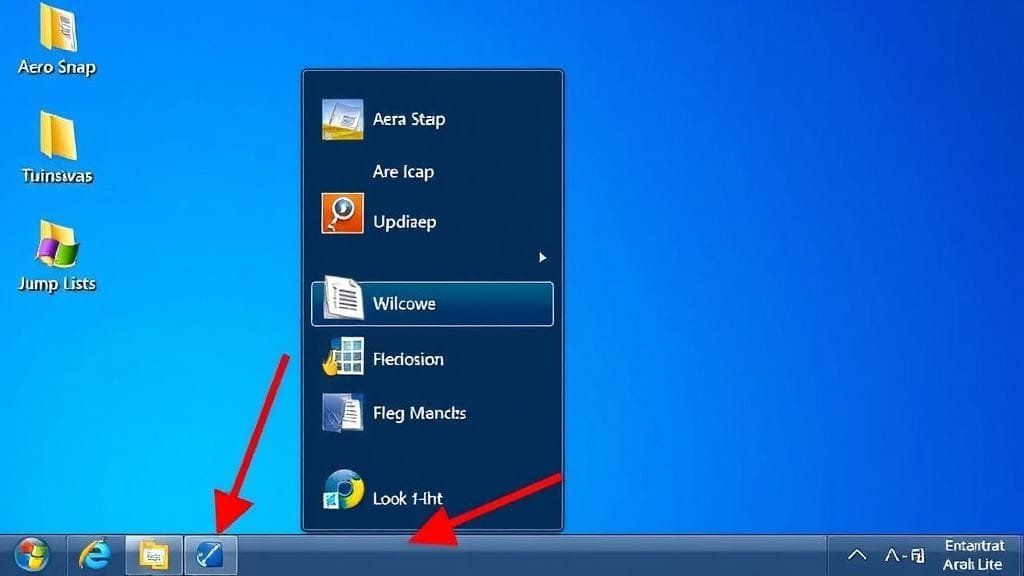
The redesigned taskbar was a cornerstone upgrade in Windows 7 Legacy. For instance, users could “pin” frequently used programs to it, giving them fast access and streamlined control. Furthermore, “Jump Lists” further accelerated task execution. Specifically, right-clicking an app icon would display a “Jump List.” This list presented recent files, common tasks, or specific program functionalities. For a browser, for example, it might display recently visited websites.
Smart Window Management with Aero Features
Several “Aero” features significantly simplified the management of multiple open windows within the Windows 7 Legacy environment:
- Aero Snap: Drag a window to the screen edge, and it would automatically resize to fill half the screen or go full-screen. This dramatically eased working with two windows simultaneously.
- Aero Shake: Shaking a window’s title bar would minimize all other open windows, clearing up the desktop. Shaking it again would then restore them.
- Aero Peek: Moving the mouse over the “Show desktop” button would make all open windows transparent, allowing a quick view of the desktop below. Clicking it would then minimize all windows.


Advancements in Interaction and Productivity
Beyond its visual appeal, Windows 7 Legacy introduced key, less obvious improvements. Specifically, these included enhanced capabilities for touch, voice, and handwriting input. These advancements prepared the OS for a growing ecosystem of touch-enabled devices. Moreover, it also offered native support for virtual hard disks (VHDs). Thus, these features collectively made it a robust platform for evolving hardware.
Several smaller, yet highly useful, tools were also improved or newly introduced:
- Libraries: These collected files from disparate locations, such as local folders or shared network drives, and organized them into a single, virtual collection.
- HomeGroup: This feature simplified file and printer sharing across home networks.
- Improved Snipping Tool: The Improved Snipping Tool allowed users to take better screenshots, making them simple to annotate and share.
- Sticky Notes: Sticky Notes provided simple desktop notes for quick reminders.
A Commercial Juggernaut: Windows 7 Legacy’s Market Dominance
Windows 7 Legacy achieved unprecedented commercial success. It quickly ascended to become the world’s leading operating system. Indeed, its widespread appeal was undeniable. Consequently, this led to massive sales and an unparalleled market share.
Unprecedented Sales and Adoption Rates
Windows 7 Legacy significantly surpassed sales predictions. Specifically, it sold over 630 million copies before the release of Windows 8 in October 2012. By October 2011, a mere two years after its launch, it had already surpassed Windows XP. In fact, it became the most popular operating system globally.
At its peak around March 2017, Windows 7 Legacy powered almost half (49%) of all computers worldwide. Furthermore, it was installed on 54% of all Windows machines. Remarkably, even in June 2022, it still commanded 11.52% of the global market share. This was years after Microsoft had officially ended its support. This demonstrated its enduring popularity. Moreover, in 2025, it continues to run on 3.59% of traditional PCs. Clearly, this illustrates remarkable user loyalty, despite the inherent risks of using an unsupported operating system like Windows 7 Legacy.
| Metric | Data Point | Significance |
|---|---|---|
| Commercial Release Date | October 22, 2009 | Successor to Windows Vista. |
| Units Sold (pre-Windows 8) | Over 630 million | Massive commercial success. |
| Market Share Peak | March 2017 | 49% global PCs, 54% all Windows machines. |
| Surpassed Windows XP | October 2011 | Achieved in just two years after launch. |
| Global Market Share (June 2022) | 11.52% | Significant user base, years after support end. |
| Global Market Share (2025) | 3.59% (traditional PCs) | Enduring presence despite severe limitations. |
The Unbreakable Bond: Windows 7 Legacy User Loyalty
The enduring success and market dominance of Windows 7 Legacy stemmed from exceptional user loyalty. Specifically, many users found it stable, reliable, and familiar. This fostered a strong reluctance to upgrade. Indeed, this loyalty was cultivated through consistently positive experiences with the system. Users also approached newer Microsoft products with caution. Consequently, this solidified Windows 7 Legacy‘s entrenched position.
The “Just Works” Philosophy of Windows 7 Legacy
The operating system earned a reputation for simply “working.” It was remarkably stable and dependable. Indeed, this translated to fewer crashes or technical issues. This fostered significant user trust. Furthermore, users appreciated its intuitive interface. They valued a system that consistently performed reliably. Therefore, they required neither constant repairs nor extensive learning curves. Ultimately, this “set it and forget it” nature was a primary reason many users remained loyal to Windows 7 Legacy.

Why Users Resisted Upgrading
User loyalty became particularly evident with the arrival of subsequent Windows versions. For example, Windows 8 introduced a “Metro” interface primarily designed for touch screens. Indeed, this represented a significant departure from the familiar desktop experience. It consequently confused many users without touch-enabled devices. Moreover, Windows 10 also sparked concerns. These included privacy issues and mandatory, often disruptive, updates. Consequently, users perceived a loss of control over their computers. Therefore, these issues contributed to many users’ decision to remain with this OS.
Several practical reasons also contributed to this resistance:
- Older Hardware: Many users possessed older computers that struggled to run Windows 10 or 11 efficiently. Furthermore, they were often reluctant to invest in new hardware.
- Special Software Needs: Businesses or individuals often relied on legacy software that was only compatible with Windows 7 Legacy. Thus, migrating to a new system would incur prohibitive costs or significant difficulty.
- Stability and Familiarity: Some users preferred the stable feel and familiar interface of this operating system. Despite knowing the dangers, they accepted them for a system they understood and trusted.
- Not Knowing the Dangers: Sadly, some users might be unaware of the serious security vulnerabilities and the end of official support for Windows 7 Legacy.
While these reasons are understandable, the dangers of an unsupported OS escalate rapidly. Therefore, upgrading from Windows 7 Legacy is highly recommended.
The Inevitable End: Support, Security, and Vulnerabilities for Windows 7 Legacy
All operating systems eventually reach their end-of-life. Consequently, for this OS, Microsoft ceased providing official support. Therefore, this introduced significant security risks. Thus, Windows 7 Legacy entered a new, perilous period.
Mainstream and Extended Support Milestones
Mainstream support for Windows 7 Legacy concluded on January 13, 2015. This meant the cessation of free non-security updates. More importantly, its extended support officially ended on January 14, 2020. Consequently, after this date, home users no longer received free security updates. Thus, this left Windows 7 Legacy systems vulnerable to new, unpatched exploits.

The Serious Security Risks for Windows 7 Legacy Users
Operating an unsupported OS like Windows 7 Legacy presents severe security risks once its extended support concludes. Indeed, without regular security updates, computers become prime targets for cybercriminals. Furthermore, new malware and sophisticated attacks can easily infiltrate. Consequently, this translates to increased exposure to threats. For example, these risks encompass malware suchS viruses, ransomware, and spyware. Data breaches, identity theft, and financial scams are also significant threats. Moreover, computers can even be unknowingly recruited into botnets. Ultimately, an unsupported OS is highly susceptible to today’s evolving cyber threats. Therefore, maintaining Windows 7 Legacy operations is inherently risky.
Microsoft had offered a paid program known as Extended Security Updates (ESU). Specifically, this program was primarily targeted at large enterprises and government organizations. It provided critical security updates for up to three additional years. However, it was prohibitively expensive. It was neither simple nor affordable for individual users to acquire. Ultimately, the ESU program itself concluded on January 10, 2023. As a result, virtually all Windows 7 Legacy computers were left without defense.
The Challenges of Clinging to Windows 7 Legacy Technology
While many users deeply appreciate Windows 7 Legacy, continuing its use today presents more tangible challenges than just security vulnerabilities. Indeed, these issues are steadily growing. Specifically, these problems impact operational functionality. Furthermore, they also limit software and service compatibility.
Compatibility Issues
Modern programs and hardware components are designed for newer operating systems. Consequently, many new applications often fail to function correctly with Windows 7 Legacy. Games, office suites, and creative software might require newer libraries or runtime environments. Therefore, they may be incompatible. Moreover, newer peripheral devices might lack compatible drivers for the system. Consequently, this imposes frustrating restrictions on Windows 7 Legacy users.
The End of Browser and Service Support
The internet is indispensable to modern computer usage. Thus, users of this system face significant challenges online. Major web browser developers like Microsoft Edge and Google Chrome ceased supporting Windows 7 (and 8/8.1) in early 2023. While these browsers may still operate, nonetheless, they no longer receive critical security fixes or feature updates. Clearly, this has profound implications. In fact, this renders them increasingly insecure. They also may struggle to display modern websites correctly. Furthermore, prominent services like Steam ceased functionality with the OS in early 2024. This meant users could no longer access new games or utilize new features. Consequently, this fundamentally altered the Windows 7 Legacy user experience.
Why Some Users Still Persist with Windows 7 Legacy
A persistent minority of users continues to utilize Windows 7 Legacy. Their motivations often stem from specific circumstances:
- Older Hardware: Many users continue to operate older computers incapable of efficiently running Windows 10 or 11. Moreover, they are often disinclined to purchase new hardware.
- Special Software Needs: Certain businesses or individuals depend on proprietary legacy software exclusively compatible with Windows 7 Legacy. Transitioning to a newer system would entail prohibitive costs or significant operational disruption.
- Stability and Familiarity: Some users highly value the stable environment and familiar interface of this operating system. Fully aware of the security risks, they nonetheless prioritize a system they deeply understand and trust.
- Not Knowing the Dangers: Regrettably, some users may remain uninformed about the severe security vulnerabilities and the definitive end of official support for Windows 7 Legacy.
While these justifications are understandable, the inherent dangers of an unsupported OS compound rapidly. Therefore, upgrading from Windows 7 Legacy remains critically important.
The Lasting Echoes: Windows 7’s Enduring Legacy
The Windows 7 Legacy era has officially concluded. However, it leaves behind an indelible legacy. It educated both the tech world and users about the hallmarks of a truly great operating system. Specifically, these hallmarks include dependability and user-friendliness. Furthermore, it introduced genuine innovations within a familiar, accessible package. In essence, it represented the pinnacle of the classic desktop computing experience.
A Benchmark for Future Operating Systems
This operating system established a formidable benchmark for its successors. Indeed, its intuitive design, robust performance, and clever features became a paradigm. This held true for subsequent Windows versions. Moreover, its influence extended to rival operating systems as well. For years, the question “Is it as good as Windows 7?” served as a frequent litmus test. Clearly, its impact on user interface design is readily apparent. For example, many of its most effective elements, such as the taskbar and window management, were refined and integrated into later Windows versions.
The Importance of Staying Updated
Its remarkable longevity and eventual end of official support serve as a powerful reminder of why OS updates are so crucial. Of course, the temptation to cling to a beloved OS is strong. However, the digital landscape continuously evolves. Consequently, security threats proliferate. Hardware advances. Meanwhile, software undergoes constant development. Therefore, staying updated ensures your safety. Furthermore, it grants access to new programs. It also optimizes your computer’s performance. Most importantly, it safeguards your digital life.
Conclusion: A Fond Farewell to a Digital Icon
The Windows 7 Legacy era represented a golden age for many computer users. It seamlessly combined stability, speed, and intuitive design. Ultimately, these elements coalesced to create an almost universally lauded operating system. Moreover, it was characterized by massive sales and profound user loyalty. Consequently, this cemented its status as one of the most popular versions of Windows ever released. From its innovative taskbar and refined window management to its dependable “just works” ethos, the OS truly earned its iconic status.
Though its official support has ended, its legacy continues to influence design principles and user expectations. Yet, the digital landscape has advanced considerably. Therefore, continued use of the system is increasingly perilous and less practical. Nonetheless, the narrative of Windows 7 Legacy exemplifies meticulous planning. Moreover, it showcases user-centric design. Furthermore, it highlights the deep bond between users and their technology. It indelibly shaped a generation of computer users.