Embarking on building your first PC is incredibly rewarding. It offers customization, performance, and personal satisfaction. In 2025, this is, moreover, more accessible and powerful than ever. Consequently, you can craft a machine perfectly tailored to your needs. This holds true for hardcore gamers, creative professionals, or versatile system seekers. Indeed, forget pre-built limitations. Instead, your custom PC awaits your vision.

Why Build Your First PC in 2025?
The allure of building your own PC remains strong in 2025. Furthermore, compelling reasons resonate with all users. You gain unparalleled control over every component. Thus, this ensures optimal performance for specific tasks. Moreover, you often achieve a better price-to-performance ratio than off-the-shelf options. The knowledge gained from this process, therefore, is invaluable. It empowers you, ultimately, to troubleshoot and upgrade your system with confidence.
The Allure of a Custom PC Build
Imagine, first, a machine that truly feels like an extension of yourself. It is, moreover, optimized for your favorite games and daily software. Even your aesthetic preferences, therefore, are met. This level of personalization, indeed, is the bedrock of PC building. You’re not just assembling parts. Instead, you are engineering your digital kingdom, piece by piece. It will, consequently, meet your exact specifications.
Beyond the Box: Upgradability and Value
One great advantage of building your first PC, specifically, is its inherent upgradability. Custom PCs differ, however, from sealed pre-built systems. You can, therefore, easily swap out components as technology evolves. This also applies, furthermore, as your needs change. Your initial investment, consequently, stretches further. This, in turn, saves you money long-term. Your system remains, moreover, cutting-edge without needing a complete overhaul. It’s a testament to long-term value.
Decoding the Core Components for Your First PC Build
Understanding fundamental components, therefore, is crucial for any successful first PC build. Think of each part as a vital organ. Indeed, they work in harmony to bring your digital dreams to life. Prioritizing your budget across these components, therefore, is key. It maximizes, consequently, performance where it matters most for you. Let’s, furthermore, dive into what 2025 offers.
CPU: The Brain of Your Machine
The Central Processing Unit (CPU) acts as your computer’s brain. Essentially, it executes instructions and processes data. In 2025, stellar options exist, moreover, from both AMD and Intel. AMD’s Ryzen 8000 and 9000 series are, indeed, formidable. The Ryzen 9950X3D stands out, specifically, for high-end gaming. It also, furthermore, excels at intensive multitasking. It boasts, moreover, an impressive blend of cores and cache.
Intel counters with its 14th-generation and new Core Ultra 7 processors. These, in fact, offer robust performance across the board. For many gamers, however, an Intel i5 or AMD Ryzen 5 processor delivers exceptional in-game performance. This comes, crucially, at a significantly lower cost. This strategic choice, consequently, frees up more budget for the GPU. The Graphics Processing Unit directly impacts your gaming experience. When selecting a CPU, therefore, consider its platform’s upgrade path. Examples include, specifically, AMD’s AM5 or Intel’s LGA 1700/1851 sockets. This foresight, ultimately, helps future-proof your system.
GPU: Your Gaming Powerhouse
The Graphics Processing Unit (GPU) is critical. Indeed, it is the single most important component for gaming performance. It typically commands, moreover, 30-40% of your total budget. In 2025, NVIDIA’s RTX 5000 series leads the charge; AMD’s Radeon RX 8000/9000 series also leads. Both, consequently, push graphical fidelity to new heights.
Mid-range options, however, are strong contenders for smooth 1440p gaming. These include, for instance, the NVIDIA RTX 5060 Ti or AMD RX 9060 XT. Both should, furthermore, ideally come with 16GB of VRAM. This handles, moreover, modern textures. It also, crucially, future-proofs against increasing memory demands. NVIDIA GPUs often boast, furthermore, superior software features. They also, in addition, offer better ray-tracing performance. AMD, conversely, typically offers a compelling price-to-performance ratio. This makes it, ultimately, a difficult but exciting choice for your first PC build.

Motherboard: The PC’s Foundation
Your motherboard is the backbone connecting all components. Choosing wisely, therefore, is paramount. It must, specifically, match your chosen CPU’s socket type. For example, AM5 works for current AMD Ryzen processors; LGA 1700/1851 works for Intel. Beyond compatibility, moreover, ensure it supports modern features. Look for, specifically, Wi-Fi 6E/7 for blazing-fast wireless networking. DDR5 RAM, furthermore, offers enhanced memory performance. PCIe 5.0 is, in addition, for next-generation GPUs and SSDs.
Higher-end chipsets, such as AMD’s X670E or Intel’s Z790/B850, provide more features. They offer, indeed, robust power delivery for high-performance CPUs. They often have, furthermore, better overclocking potential. Skimping on the motherboard, however, can lead to issues. These include, for instance, VRM overheating or slower SSD speeds. RAM instability can also occur. This undermines, consequently, your entire first PC build.
RAM: Speed and Multitasking
Random Access Memory (RAM) serves as your system’s short-term memory. It is, moreover, crucial for multitasking and loading applications. In 2025, 32GB of DDR5 RAM is the sweet spot. Most builders, therefore, will find it offers ample headroom. It suits, moreover, gaming, streaming, and productivity tasks. While 16GB can suffice for some, 32GB provides, indeed, a much better experience. It significantly enhances, furthermore, future-proofing.
When selecting DDR5 RAM, therefore, aim for speeds around 6000MHz. Additionally, pay attention to latency. This is expressed, specifically, as CL (CAS Latency). Lower CL numbers are, moreover, better. For AMD builds, in particular, low latency like CL30 is ideal. This maximizes, consequently, performance due to how Ryzen CPUs interact with memory.
Storage: Blazing Fast NVMe SSDs
Gone are, indeed, the days of slow, clunky hard drives for your primary operating system. Fast NVMe Solid State Drives (SSDs) are now, moreover, essential. They provide, furthermore, lightning-quick boot times. They enable, in addition, snappy application launches and rapid game loading. In 2025, prioritize, therefore, a 1TB or larger NVMe SSD. It accommodates, moreover, your operating system and essential software. It also, furthermore, holds a growing library of games.
PCIe 4.0 drives, however, offer an excellent balance of speed and value. They provide, moreover, more than enough performance for most users. For the absolute bleeding edge, PCIe 5.0 drives are available. They are also for those handling extremely large files regularly. However, they come at a premium.

Power Supply Unit (PSU): The Unsung Hero
Never, therefore, ever compromise on your Power Supply Unit (PSU). This component, indeed, is the unsung hero. It delivers, furthermore, stable and consistent power to every part of your system. An 80 Plus certified unit is, moreover, vital. Gold or Platinum ratings offer, consequently, superior efficiency and reliability. This ensures, furthermore, system stability and component longevity. It also, in addition, reduces your electricity bill.
For a typical first PC build in 2025, therefore, a 750W PSU is generally sufficient. However, plan for high-end components or future upgrades. Stepping up to an 850W or 1000W unit offers, consequently, crucial headroom. A high-quality PSU ensures, furthermore, clean power for components. This prevents, moreover, crashes and potential damage.
Case and Cooling: Breathing Room for Your Build
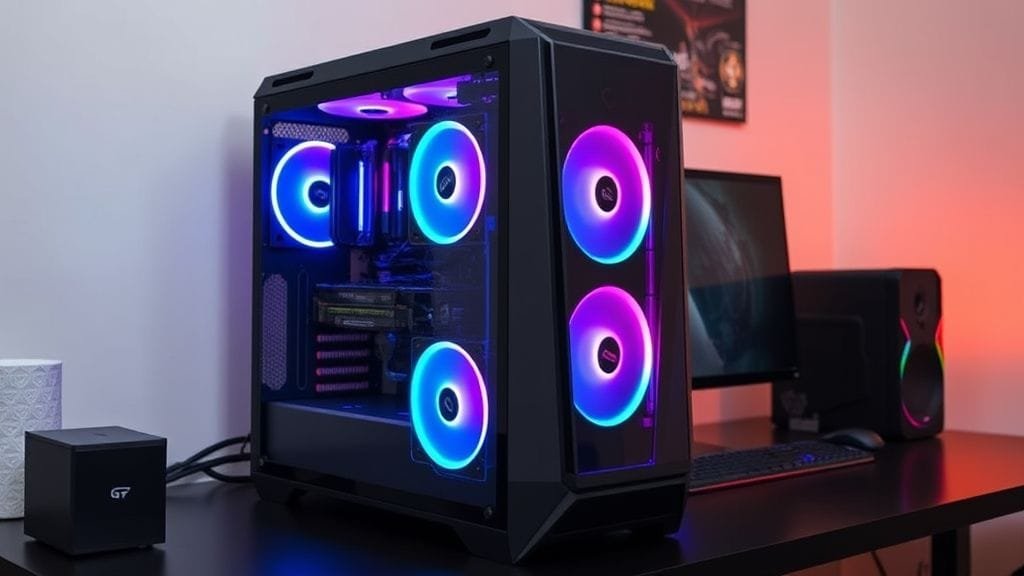
Your PC case isn’t just a shell. Instead, it’s a critical component for airflow and aesthetics. A mid-tower ATX case is, therefore, generally recommended for building your first PC. It offers, moreover, ample space for components. It also provides, furthermore, good airflow potential and easier cable management. Look for, specifically, cases with mesh fronts. Multiple fan mounting points also ensure efficient cooling.
Effective cooling, indeed, is paramount. It prevents, moreover, thermal throttling, which degrades performance. It also, furthermore, extends the lifespan of expensive components. You’ll choose between air coolers and AIO liquid coolers. Air coolers use, specifically, heatsinks and fans. AIO liquid coolers offer, conversely, superior performance. They also, in addition, have a sleeker look. However, they often come at a higher price. Installation is, moreover, more complex.

Budgeting for Your First PC in 2025
Creating a realistic budget, therefore, is a cornerstone of a successful first PC build. In 2025, gaming PC budgets fall into three categories. These are, however, fluid and depend on sales and choices.
- Entry-Level ($999–$1,399): Perfect for 1080p gaming at high refresh rates. It also suits, moreover, comfortable 1440p gaming with some settings tweaks.
- Mid-Range ($1,400–$1,899): This is the sweet spot for exceptional 1440p gaming. It even offers, furthermore, entry-level 4K experiences.
- High-End ($1,900–$3,000+): Designed for uncompromised 4K gaming. It suits, moreover, professional content creation. It also provides, furthermore, future-proof performance.
Remember, however, the golden rule. Allocate, therefore, 30-40% of your total budget to the GPU. Dedicate, furthermore, 20-30% to the CPU. This prioritizes, consequently, gaming performance. Gaming is often the primary driver for custom builds. Prioritizing these key components will, therefore, allow for the most impactful performance.
Future-Proofing Your First PC Build: The 2025 Edge
True “future-proofing” is a myth in tech. Yet, smart choices can, nonetheless, extend your PC’s relevance. They also, moreover, boost upgradeability. This means, consequently, looking beyond current needs. Anticipate, instead, tomorrow’s demands. The year 2025 ushers in, furthermore, a new era for personal computing. AI integration, in particular, heavily influences it.
Embracing the AI PC Era
2025 is widely anticipated as the “Year of the AI PC.” This marks, consequently, a significant shift. Personal computers will handle demanding workloads differently. Next-generation systems feature, moreover, dedicated Neural Processing Units (NPUs). These, in fact, efficiently manage AI tasks locally. The benefits are, indeed, profound. Expect, therefore, noticeable performance boosts in AI-accelerated applications. Battery life improves, furthermore, for laptops. Desktops see, in addition, lower power consumption. Privacy is, moreover, enhanced by on-device AI processing. Productivity increases, furthermore, through intelligent features.
Dedicated AI chipsets will also, moreover, revolutionize collaboration. They offer, furthermore, superior background blur. Noise cancellation and real-time translation capabilities are, in addition, improved. When choosing components for your first PC build, therefore, consider AI support. Look for, specifically, newer CPUs with integrated NPUs. GPUs with advanced AI acceleration features are also, moreover, key. This forward-thinking approach contributes, ultimately, significantly to your build’s longevity and utility.

Beyond AI: Other Future-Proofing Strategies
Beyond AI capabilities, moreover, other strategies exist. They help, furthermore, your first PC build stand the test of time. Opt for, specifically, high-core-count CPUs. This is especially true, moreover, if you multitask or run demanding applications. Ensure, therefore, your motherboard and CPU support PCIe 5.0. This allows, consequently, the fastest possible storage and GPU bandwidth. GPUs with ample VRAM are also, furthermore, crucial. Aim for 16GB minimum. 24GB or more is, moreover, ideal for 4K gaming and professional tasks.
Choose DDR5 RAM with expandability. This lets you, moreover, add more modules later. Look for motherboards with USB4 or Thunderbolt 4 ports. They offer, indeed, versatile, high-speed connectivity. Wi-Fi 7 or 6E provides, furthermore, the fastest wireless networking. Finally, select a high-wattage, efficient PSU. You’ll likely keep this component, moreover, through several upgrades. It provides, consequently, necessary power for increasingly demanding hardware. For more on component compatibility, therefore, check our guide on [/blog/understanding-pc-component-compatibility/].
Common Pitfalls to Avoid When Building Your First PC
Even experienced builders, indeed, make mistakes. For first-timers, however, the process can feel like a puzzle. These pieces are, moreover, expensive. Fortunately, awareness of common pitfalls helps. You can, therefore, navigate your first PC build with confidence. Avoid, consequently, frustrating setbacks.
Here are some frequent issues to watch out for:
- Neglecting Component Compatibility: Always, therefore, double-check CPU socket and motherboard match. Ensure, furthermore, RAM speed and type (DDR4 vs. DDR5) are supported. Use PCPartPicker.com, moreover, to verify compatibility.
- Improper Thermal Paste Application: Correctly applying thermal paste, therefore, is crucial. It goes, specifically, between your CPU and cooler. This ensures, consequently, efficient heat transfer. Too little or too much can lead, however, to overheating.
- Forgetting Motherboard Standoffs: These small screws, indeed, lift the motherboard. They prevent, moreover, short circuits. Skipping them is, consequently, a common and potentially catastrophic error.
- Poor Airflow Planning: A powerful system, unfortunately, generates heat. Without proper intake and exhaust fans, components throttle. They will also, furthermore, degrade faster. Plan, therefore, your fan layout carefully.
- Choosing an Underpowered or Low-Quality PSU: As mentioned, indeed, your PSU is vital. Insufficient wattage or a cheap unit leads, furthermore, to instability. It can also cause, moreover, crashes and component damage. Never, therefore, skimp here.
- Skimping on the Motherboard: Saving a few dollars is tempting. Yet, a low-end motherboard causes, nonetheless, issues. These include, for instance, inadequate VRM cooling for your CPU. Slower NVMe SSD speeds and unstable RAM performance can also occur. Invest, therefore, in a board that supports your components well.
Your First PC Build: A Rewarding Journey
Building your first PC in 2025 is more than assembling hardware. Instead, it’s an empowering journey. It culminates, moreover, in a truly personal, high-performance machine. You gain, furthermore, a deeper understanding of technology. Enjoy, moreover, unmatched customization and long-term upgradability. The sense of accomplishment is, indeed, truly unforgettable. It happens, specifically, when your freshly built PC boots up. Take your time and, moreover, follow the steps. Don’t be afraid, furthermore, to consult reputable resources. For detailed instructions, for instance, see [Tom’s Hardware’s PC Building Guide](https://www.tomshardware.com/how-to/how-to-build-a-pc).
You’re not just buying a computer. Instead, you are investing in a powerful tool. It will, furthermore, serve you for years to come. With careful planning and attention to detail, therefore, your first PC build will be a resounding success. For insights on component performance and reviews, moreover, check out [Gamers Nexus](https://www.youtube.com/user/GamersNexus). If hiccups occur, furthermore, our troubleshooting guide can help: [/blog/troubleshooting-your-new-pc-build/].
What component are you most excited to choose for your first PC build? Share, therefore, your thoughts and aspirations in the comments below!